Why the first-launch tutorial rarely sticks
A tutorial on the first screen arrives at the moment you know least about the app and have the least time for it. You tap “Next” five times to get to the app itself, and an hour later you couldn't say what any of those screens showed. That's normal: we remember how to do something when we need it, not when someone shows it in advance.
The trouble starts later. A week on, you want to add a reminder or invite your partner, and the help you skipped isn't there any more. Some apps hide the replay deep in settings; many don't offer one at all.
What actually helps you get started
- Start with one real errand. Something you have to do this week — “Renew the car insurance”, “Buy a present for Grandma”. A real errand teaches more than a demo, because you care whether the reminder comes.
- Learn the next thing when you need it. Sharing, repeating errands, birthdays — each one makes sense the day you have a reason to use it.
- Keep help one tap away. Being able to look back at the steps is what makes it fine to skip them the first time.
- Bring the family in once it works for you. It's easier to show someone an app you already use than one you're still figuring out.
Your first errand in Family Errands
When you create your account, the app isn't empty: it adds a “Getting started” checklist errand, a note about the app's features and a “First day with Family Errands” entry in Birthdays, so you can see what each section looks like before adding your own.
The walkthrough itself is short. The app's beaver guides you through one errand:
Give it a title
Write the errand the way you'd say it — “Pick up the dry cleaning”.
Choose when
Today, tomorrow, in two days or any other date.
Set a time
That's when the reminder comes.
Add a reminder
So the phone remembers instead of you.
Save it
It now appears in your calendar.
Invite your family
Send an invitation so they can see what you share with them. You can also skip this and come back to it later.
Come back to the walkthrough any time
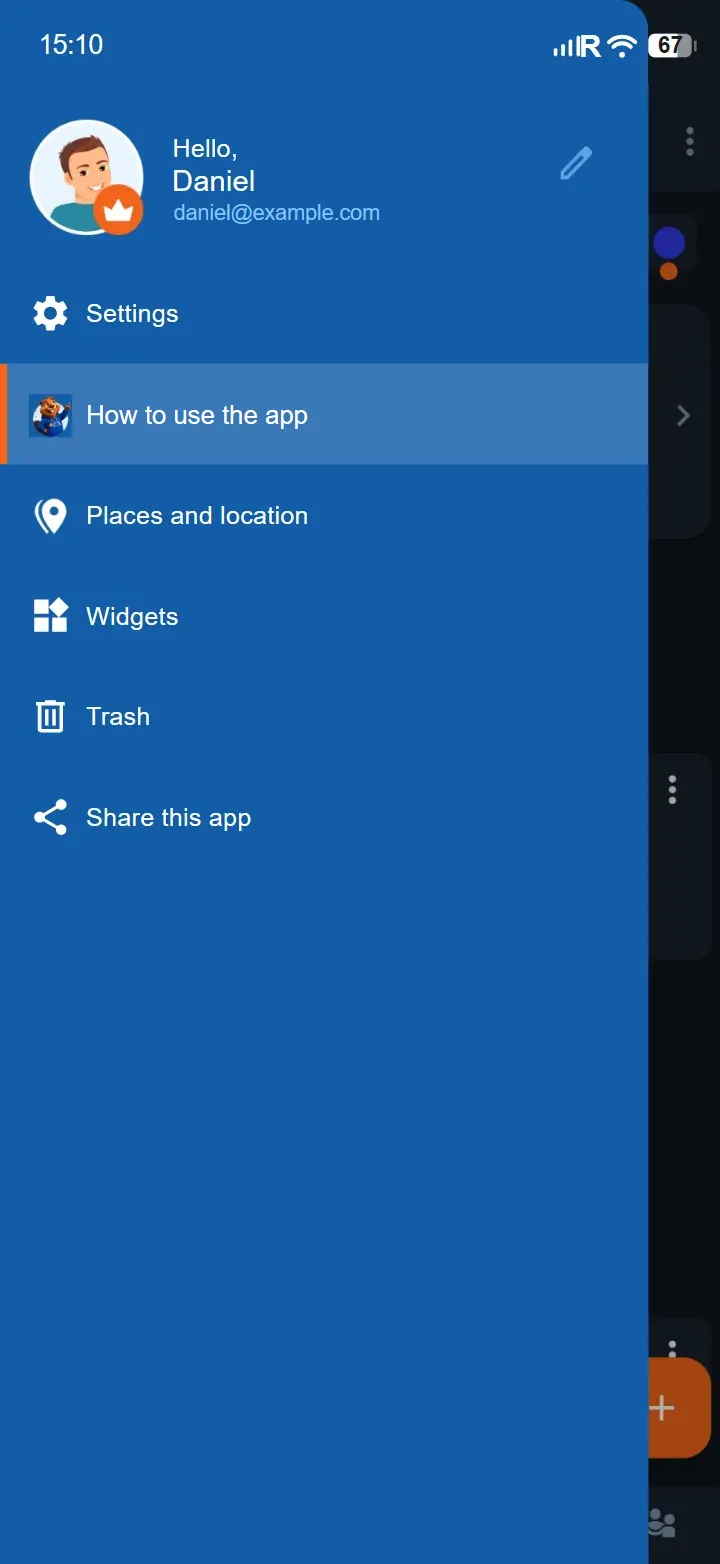
If you skipped the walkthrough, or did it once and forgot half of it, open the menu and choose “How to use the app”. It opens again from the beginning, as many times as you like — it doesn't disappear after the first launch.
It's also handy when your partner or an older child joins the family later: they can go through the same steps on their own phone, at their own pace, without you explaining over their shoulder.
Questions
Can I see the tutorial again after skipping it?
Yes. In Family Errands, open the menu and choose “How to use the app” — the walkthrough starts again, and you can repeat it as often as you need.
Do I have to set up everything before I can use the app?
No. You can create your first errand straight away and add sharing, birthdays and repeating errands later, when you need them.
What are the items already in my account?
A “Getting started” checklist, a note about the app's features and a “First day with Family Errands” entry in Birthdays. The app adds them when you create your account so the screens aren't empty; you can delete them whenever you like.