We have updated our Privacy Policy and Terms of use. The new versions apply from 17.November.2026. Privacy Policy · Terms of use

Ask a question

Blog Cross-Board Reporting & Dashboards

Trello Workload: Cards per Member Across Boards

A Trello workload view shows how many open cards each person has across all boards, so you can see at a glance who's stretched and who has room. On one board that's easy to eyeball; when the same people work on five project boards, their real load only shows up when the boards are counted together.

What to look at

  • Open cards per person — the overall load.
  • Overdue cards per person — where help is needed now.
  • Due this week per person — the near-term crunch.
  • Hours or points per person, if you track them in a Custom Field.
  • Unassigned cards — work that nobody has picked up.

Card counts are a rough measure: one card can be an hour or a week. Use them to start a conversation, not to judge.

Illustration: four teammates behind stacks of cards of different heights, one moving a card from the tallest stack to a shorter one

Build it with Cross-Board Reporting & Dashboards

  1. Enable the Power-Up

    on the team's boards.

  2. Bar chart “Open cards by member”

    All boards, Lists not equal “Done”, split by Members.

  3. Bar chart “Overdue by member”

    The same split with the condition Overdue.

  4. Pie chart for shares

    The same split as a pie shows each person's part of the total.

  5. Table for one person

    Condition Members equals the person, Lists not equal “Done”, sorted by Due date — handy for a one-to-one.

  6. Unassigned work

    A counter with the condition Members not empty — No.
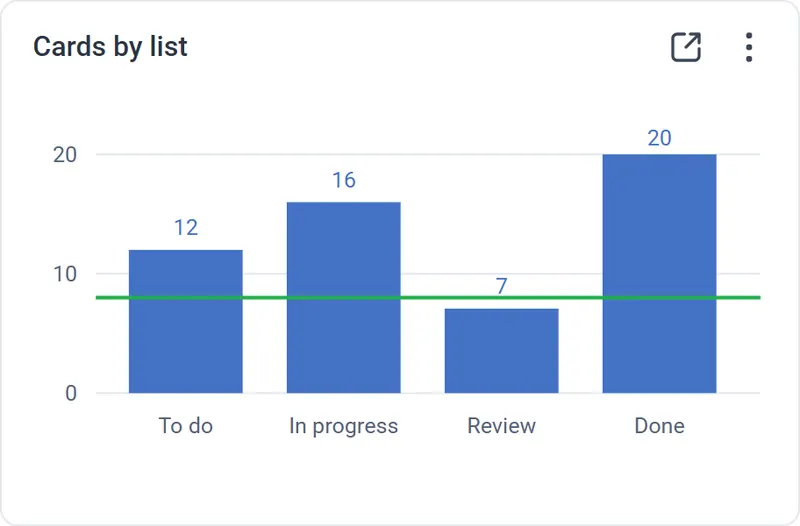
Bar chart widget comparing couriers

For effort instead of count, use Sum of a number Custom Field, such as Hours or Story points, split by Members.

Questions

Can each person see only their own cards?

Copy the table and set the condition to their name; they can build their own personal dashboard too.

Does it include checklist items assigned to people?

Partly: with the condition Item member equals a person, a widget counts the cards that have checklist items assigned to them.


Cookie consent

We value your privacy. Plain & Simple Solution would like to use Google cookies: for analytics, to understand how visitors use this site (pages viewed, visit length, approximate location, device and browser type), and, only if you also allow it, for advertising — to measure and personalise ads for our products. Nothing is set unless you agree. You can change your choice at any time via “Cookie settings” at the bottom of every page. More in our Privacy Policy.

Write to us

Having trouble or have a question? Write to us and we'll help you sort it out.

info@plainandsimplesolution.com
Open email app