Set up the board so it can be measured
- One list per stage, in the order deals move: Leads → Contacted → Proposal sent → Negotiation → Won.
- A separate list for lost deals, so they don't sit in the stage where they stopped.
- The same list names on every board, if each salesperson or region has its own board.
- A number Custom Field for the deal value, if you want to sum it later.

What the funnel tells you
- Leads to Contacted — are new leads followed up at all?
- Contacted to Proposal sent — do conversations turn into offers?
- Proposal sent to Won — how strong are the offers and the follow-up?
A funnel that drops sharply at one step points to one fix, instead of a vague “we need more leads”.
Build it with Cross-Board Reporting & Dashboards
Cross-Board Reporting & Dashboards is a Trello Power-Up that turns cards from one or many boards into dashboard widgets. The funnel is one of its widget types: it shows how many cards get from stage to stage, and the stages are lists or values of a field.
Add a widget and choose the funnel
Open your dashboard in the Power-Up and start a new widget with the step-by-step wizard.
Pick the sales boards
One board, or every salesperson's board for a team view.
Leave out what doesn't belong
Choose “Only cards that meet a condition” to limit the funnel to this quarter with a date condition such as Date created — Within last 90 days.
Use the lists as stages
At first every list of the boards is ticked as a stage — untick the ones that are not stages, such as the lost-deals list. The preview shows the funnel from Leads down to Won, with the number of cards at each stage.
Name it and add it to the dashboard
Next to it, a counter with the sum of the deal value in “Won” and a table of cards waiting in “Proposal sent” make a complete sales overview.
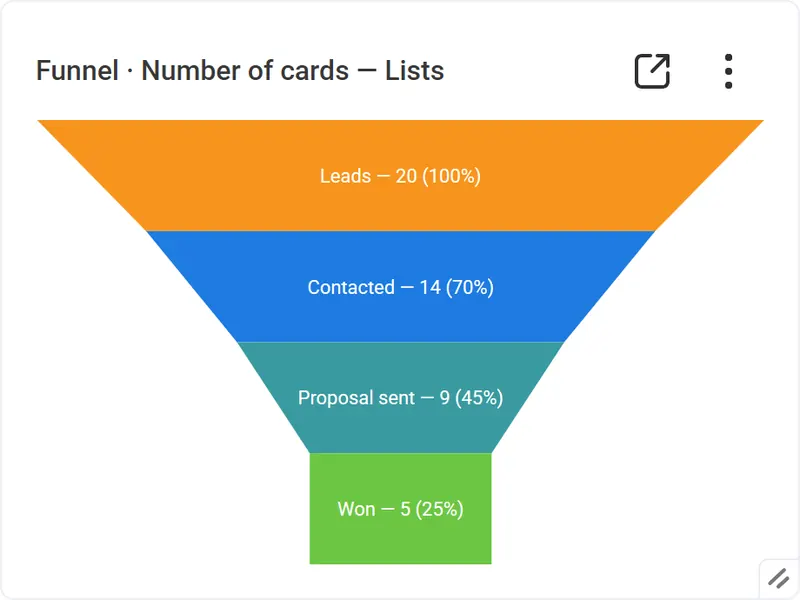
Keep the pipeline honest
- Move cards as soon as the stage changes, or the funnel shows last week's picture.
- Look at the table of deals with no activity for two weeks (Last activity — Older than 14 days): those are the ones quietly leaving the funnel.
- Compare the funnel month by month rather than day by day; a few deals make daily numbers jump.
Questions
Can Trello be used as a sales CRM?
Many small teams do: lists as stages, cards as deals, Custom Fields for value and contact details. A reporting Power-Up adds the pipeline numbers that Trello itself does not show.
Can I use a field instead of lists for the stages?
Yes. The funnel's stages can be lists or the values of a field, such as a dropdown Custom Field “Stage”.
Can the funnel combine several boards?
Yes. A widget reads as many boards as you select in the wizard, so a team with a board per salesperson gets one funnel.