Start with your post
Post redirection is usually the first step, because it catches the letters from anyone you forget. Ask your post office how redirection works where you live and how long it lasts. Then look through the post that arrives over the next few weeks: every letter forwarded from the old address is a name to add to your list.

Money
- Your bank and any savings accounts
- Credit cards and store cards
- Loans, a mortgage or car finance
- Pension providers
- Any investment or savings platforms you use
Insurance
- Home or contents insurance
- Car insurance
- Life insurance
- Travel, pet or phone insurance, if you have them
Many people contact their insurers before the moving date rather than after, so the policy covers the right home.
Home services
- Electricity, gas and water, at both the old and new address
- Internet, landline and TV
- Your mobile phone provider
- Regular deliveries: a vegetable box, milk, meal kits, subscriptions by post
- A cleaner, gardener or window cleaner who comes to the old address
Official records
- Your local services and council, where they keep records of residents
- Your tax office
- Your driving licence and vehicle records
- Your passport or identity documents, if your country asks for an update
- The electoral roll or voter register, where there is one
The rules differ from country to country, so check the official website for where you live.
Work and school
- Your employer and payroll
- Any second job, freelance clients or professional bodies
- Your children's school or nursery
- Universities, colleges or courses you're on
Health
- Your doctor
- Your dentist
- Your optician
- Pharmacies that hold repeat prescriptions for you
- Your vet, if you have pets, and the pet's microchip record
If you've moved to a new area, you may also need to register with a new doctor and dentist there.
Everyday accounts
- Online shops and delivery apps where the old address is saved as the default
- Payment apps and online accounts with a billing address
- Gyms, clubs and memberships
- Loyalty cards
- Charities you donate to
- Magazines and anything else that comes by post
People
- Family and friends
- Neighbours who might receive a stray parcel
- Anyone who sends cards at birthdays or holidays
Keep the address list in one shared list
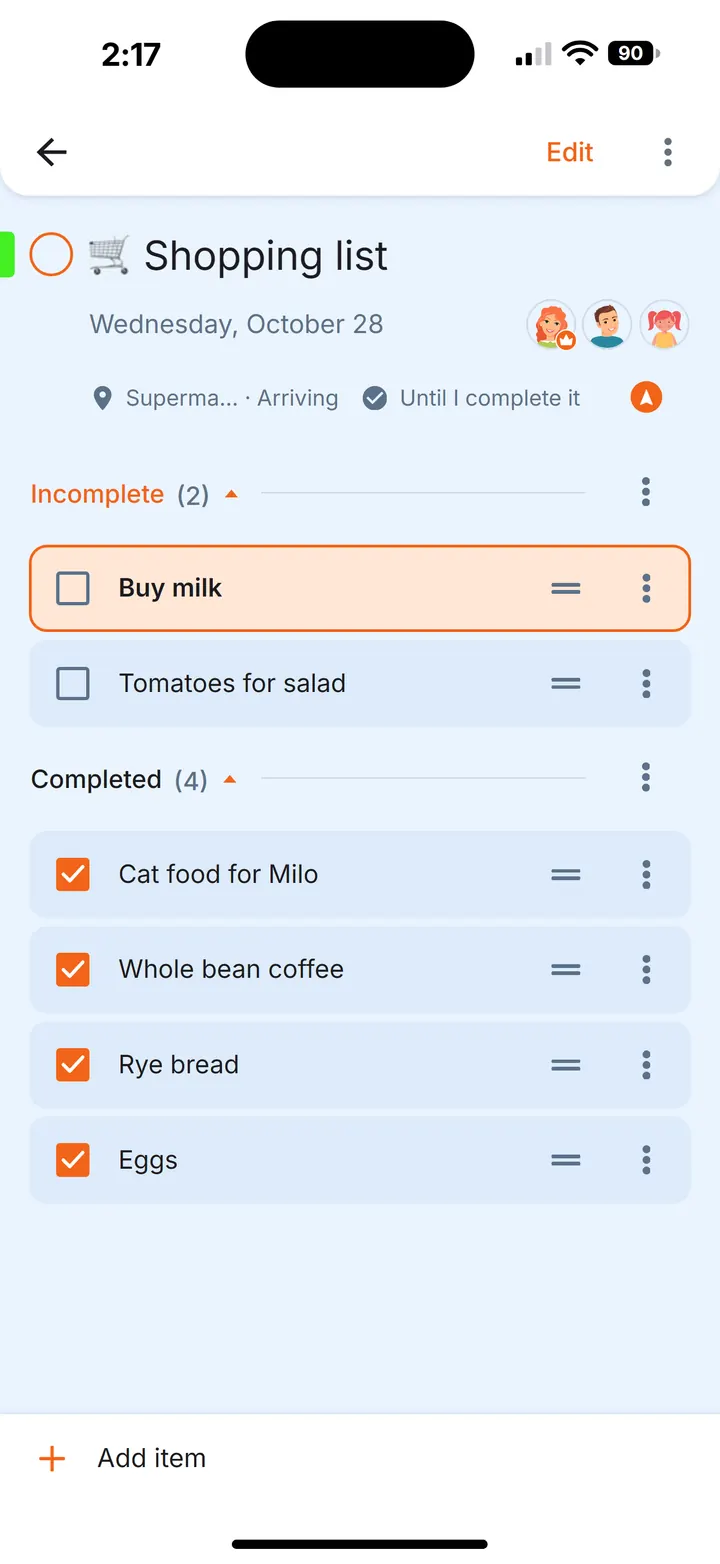
When two or more people move together, the address list is shared too: one person has the bank and the car insurance, the other has the internet and the school. A list on paper sits with whoever wrote it, and “I've told the dentist” in the family chat gets buried by the next message. In Family Errands the whole list can live in one errand that everyone moving can see and tick.
Create the address errand
Add a new errand called “New address” and give it a date, such as the moving day. Each place from the list above becomes a checklist item.
Paste a list you already have
If you've started the list in a chat or a notes app, copy it. The app offers to create a new errand from the copied text, and each line becomes a separate checklist item.
Share it
Share the errand with the people you're moving with by tapping their avatars. Everyone it's shared with can see it and edit it.
Share single items
A single checklist item can be shared on its own too, so the person who looks after the car sees exactly “Car insurance” and “Driving licence”.
Tick off what you've updated
Each person ticks items separately as they update them, and the others see what's done on their own phones once the change syncs.
Small tricks for the address list
- One errand per person or per category. For a long list, separate errands like “Address: money” and “Address: health” keep each checklist short.
- Late arrivals. Some places only show up weeks later, when a letter is forwarded. Create an errand like “Check forwarded post for old-address senders” without a date: it's shown every day until you complete it.
- Reminders that keep coming back. For the one phone call you keep putting off, set a reminder that repeats every 5 to 60 minutes until you mark the errand complete.
- Keep the list for next time. Write the categories once in a note with a checklist. At the next move, create an errand from the note; the note stays as it was.
Questions
Who do I need to notify when I change my address?
Usually your post office, bank and card providers, insurers, utility and internet providers, employer, local services and tax office, your doctor and dentist, online shops and accounts, and family and friends. Grouping them by category makes the list easier to work through.
When should I start telling people my new address?
Many people start a few weeks before the move with insurers, utilities and the post, and update everyday accounts in the weeks after. Forwarded post shows who is still missing.
What is the most commonly forgotten place to update?
Often the small ones: saved delivery addresses in online shops, loyalty cards, memberships and charities. Checking the post forwarded from your old address helps you catch them.
Can two people share the same address checklist?
Yes. In Family Errands an errand with a checklist can be shared with the family members you choose, and each person ticks items off on their own phone.
Does Family Errands work on iPhone?
Yes. Family Errands is on the App Store and Google Play, and one family can use both: a partner on iPhone and a partner on Android share the same errands.