The first day: safe, warm and usable
Before the boxes, a short walk through the home:
- Find the main water stop tap, the fuse box or consumer unit, and the gas shut-off if there is one
- Check that the lights, heating, hot water and fridge work
- Test the smoke alarms and, if you have one, the carbon monoxide alarm
- Note the meter readings and take a photo of each meter
- Check all the windows and doors close and lock
- Make the beds and set up the bathroom, so the first night is easy
- Unpack the “open first” box: chargers, kettle, mugs, toilet roll, towels, any daily medicines
The first week: essentials and paperwork
- Consider changing or rekeying the locks: you don't know how many copies of the old keys exist
- Make spare keys and agree where they're kept
- Confirm that electricity, gas, water and internet are in your names at the new address
- Check that your post is arriving and that redirection from the old address works
- Unpack the kitchen and bedrooms first; the rest can wait
- Find out which day the bins are collected and what goes in which bin
- Clean the places that are easiest to reach while the rooms are still empty: inside cupboards, the oven, the fridge
- Write down anything broken or missing, and if you rent, let your landlord know in writing
The first month: learning the new home
- Read the manuals for the boiler, the hob and any other appliances that came with the home
- Note when the heating, boiler or appliances were last serviced, if you can find out
- Look for any filters the home has: extractor hood, air conditioning, water filter
- Register with a local doctor and dentist if you've moved to a new area
- Walk the neighbourhood: nearest shop, pharmacy, post office and recycling point
- Finish unpacking room by room, and decide what to do with the boxes and packing material
- Put the regular jobs of the new home into one place (see below)
Essentials for a new home
A short shopping list many people need in the first days, often forgotten because the old home “just had it”: a toolkit and a torch, light bulbs, extension leads, a first aid kit, cleaning products and cloths, bin bags, a doormat, shower curtain or bath mat, curtains or blinds for the bedroom, and basic kitchen items like a chopping board and a tin opener.
Keep the move-in checklist in one shared list
The first weeks in a new home are full of small jobs that arrive in the wrong place: “the bathroom tap drips” is said in the hallway, “buy light bulbs” lands in the family chat, and the bin day sits on a note on someone's phone. In Family Errands these can live in one shared list.
Create the move-in errand
Add a new errand called “New home: first week” and give it a date. Each line of the list above becomes a checklist item.
Paste a list you already have
If the list is in a chat or a notes app, copy it. The app offers to create a new errand from the copied text, and each line becomes a separate checklist item.
Share it
Share the errand with the people you live with by tapping their avatars. Everyone it's shared with can see it and edit it.
Tick off as you go
Each person ticks items separately, and the others see what's done on their own phones once the change syncs.
Keep a shopping list for the essentials
A separate errand with the “essentials for a new home” as checklist items can be shared too, so whoever is at the shop sees what's still missing.
Set up the new home's regular jobs
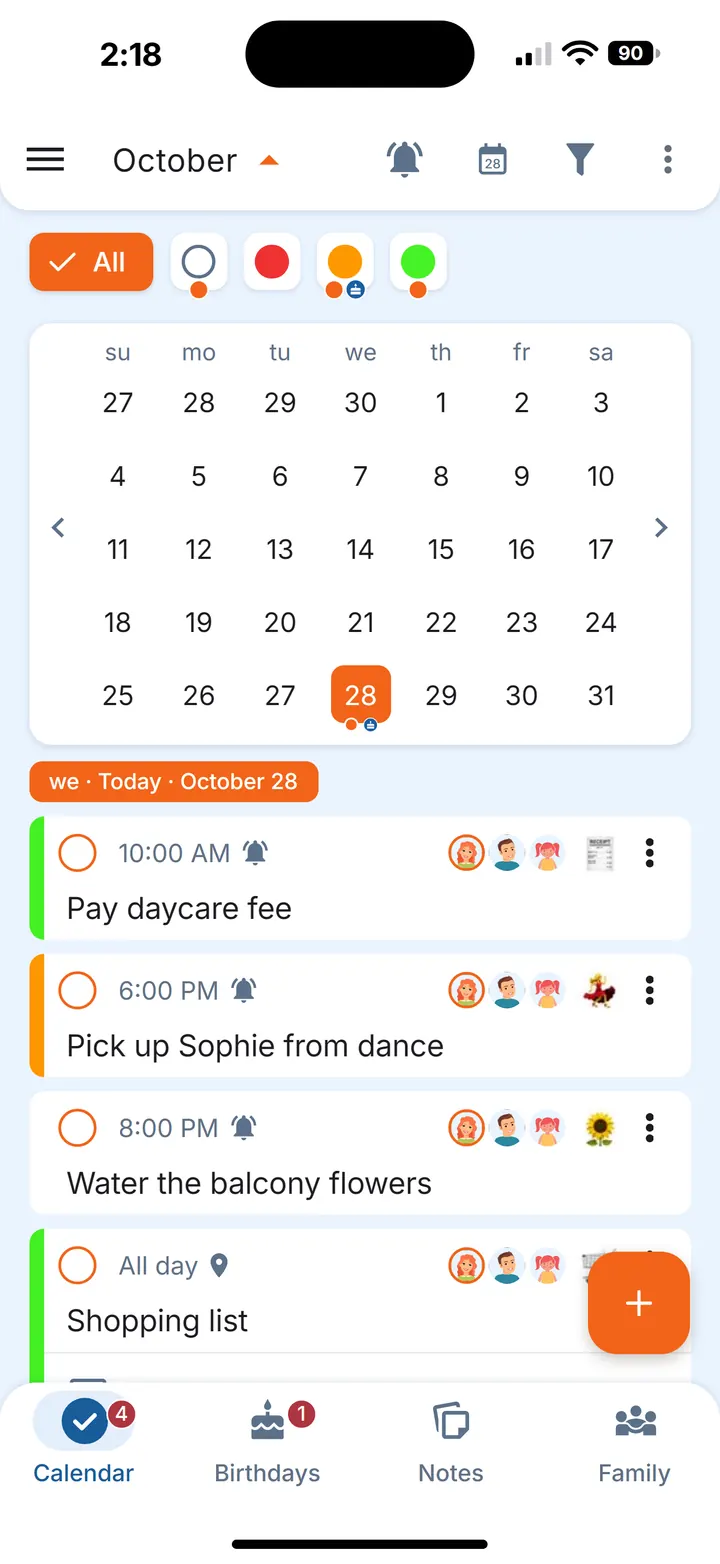
A new home comes with its own calendar: a bin day you haven't learned yet, a rent or bill date, a boiler service that's due once a year. Setting these up once in the first month means they come back by themselves.
Bins and weekly jobs
Create an errand like “Take the bins out” and make it repeat weekly on the collection day, with a reminder the evening before.
Monthly dates
Rent on the last day of the month or meter readings on the 25th can be set directly as monthly repeats.
Yearly jobs off the weekend
A boiler service, a chimney check or the home insurance renewal can repeat yearly; if the date falls on a weekend, the errand moves to the nearest earlier or later day that suits you.
Filters and things that run out
For a water filter or an extractor filter, make a repeating errand and switch on stock tracking and the low-stock reminder: each completion lowers the remaining amount, and the app reminds you when only a few are left.
Share the regular ones
Share each repeating errand with the people it concerns. The time is the same for everyone, and each person sets their own reminder.
For a full list of what to repeat daily, weekly and monthly, see Household chores list: daily, weekly and monthly. If you're moving in with a partner for the first time, List of household chores for couples covers sharing them.
Small tricks for the first weeks
- Fixes without a date. “Fix the wardrobe door” or “Put up the shelf in the hall” don't need a fixed day. Create them without a date: they're shown every day until you complete them.
- One list per room. A separate errand per room (“Kitchen”, “Bedroom”, “Hall”) keeps each checklist short while you unpack.
- Reminders that keep coming back. For the one call you keep putting off, set a reminder that repeats every 5 to 60 minutes until you mark the errand complete.
Questions
What should you do first when moving into a new house?
Many people start with a walk through the home: find the water stop tap and the fuse box, check the alarms, note the meter readings and make the beds. Paperwork and unpacking can follow over the first week.
Should you change the locks when you move in?
Many people do, or have them rekeyed, because there's no way to know how many copies of the old keys exist. If you rent, ask your landlord first.
What do you need to buy for a new home?
Usually small everyday things: light bulbs, a toolkit and torch, extension leads, cleaning products, bin bags, a first aid kit and curtains or blinds for the bedroom.
Can two people share the same move-in checklist?
Yes. In Family Errands an errand with a checklist can be shared with the family members you choose, and each person ticks items off on their own phone.
Does Family Errands work on iPhone?
Yes. Family Errands is on the App Store and Google Play, and one family can use both: a partner on iPhone and a partner on Android share the same errands.