Daily chores
Small jobs that keep the home usable. Most take a few minutes each:
- Wash the dishes or run the dishwasher
- Wipe kitchen counters and the table
- Make the beds
- Tidy the living room and put things back in place
- Take out the rubbish if the bin is full
- Quick sweep of the kitchen floor
- Feed and walk pets
- Check tomorrow's plans: school bags, appointments, what's for dinner
Weekly chores
The weekly round is where the real cleaning happens. Many households pick one or two fixed days for it:
- Vacuum and mop the floors
- Clean the bathroom: toilet, sink, shower or bath
- Change bed sheets (every one or two weeks)
- Do the laundry and put it away
- Dust surfaces and shelves
- Clean out the fridge before the big grocery shop
- Take the bins out on collection day
- Water the plants
Monthly chores
Jobs that are easy to forget because they don't happen often:
- Clean the oven and the microwave
- Wipe kitchen cabinets and appliance fronts
- Wash windows and mirrors
- Vacuum under furniture and upholstery
- Clear out expired food from the cupboards
- Pay rent and regular bills, submit meter readings
- Check smoke alarms
Seasonal and yearly chores
- Defrost the freezer (every few months)
- Replace water, air conditioning or extractor filters
- Wash curtains and duvets
- Boiler or heating service, chimney check
- Car insurance, car service, tax return
- Declutter wardrobes when the season changes
Turn the list into repeating errands
A printed list on the fridge works until someone forgets to look at it. In Family Errands each chore can be an errand that repeats on its own schedule and reminds you on the right day.
Create the errand
Add a new errand in the calendar, give it a name — “Take the bins out” — and set the day and time.
Choose how it repeats
Make it repeat daily, weekly, monthly or yearly, or fine-tune it: every 3 days, every 2 weeks, only on Mondays and Thursdays.
Use the awkward dates
Monthly errands can fall on a fixed date (the 25th), on the last day of the month, on a given weekday of the month (the second Tuesday) or on the last such weekday (the last Friday).
Keep yearly jobs off the weekend
For monthly and yearly errands you can exclude inconvenient days: if the date lands on a weekend, the errand moves to the nearest earlier or later day that suits you.
Add a reminder
Set a time reminder — or several — so the chore comes to you instead of waiting on a list.
When a week doesn't go to plan, skip one occurrence without touching the rest of the chain. To change a chore later, you choose whether the change applies to just this occurrence, to this and the following ones, or to all of them.
Small tricks that help
- Chores without a deadline. “Fix the wardrobe door” doesn't need a date. Create it without a date: it's shown every day until you complete it.
- Reminders that keep coming back. For a job you tend to put off, make the reminder repeat every 5 to 60 minutes until you mark the errand complete.
- A cleaning routine as a template. Write your monthly deep-clean steps once in a note with a checklist. When it's time, turn the note into an errand and tick the steps off one by one; the note stays for next month.
- Things that run out. Water filters, dishwasher tablets, contact lenses: make it a repeating errand and turn on stock tracking: each completion lowers the remaining amount, and the app can remind you when only a few are left.
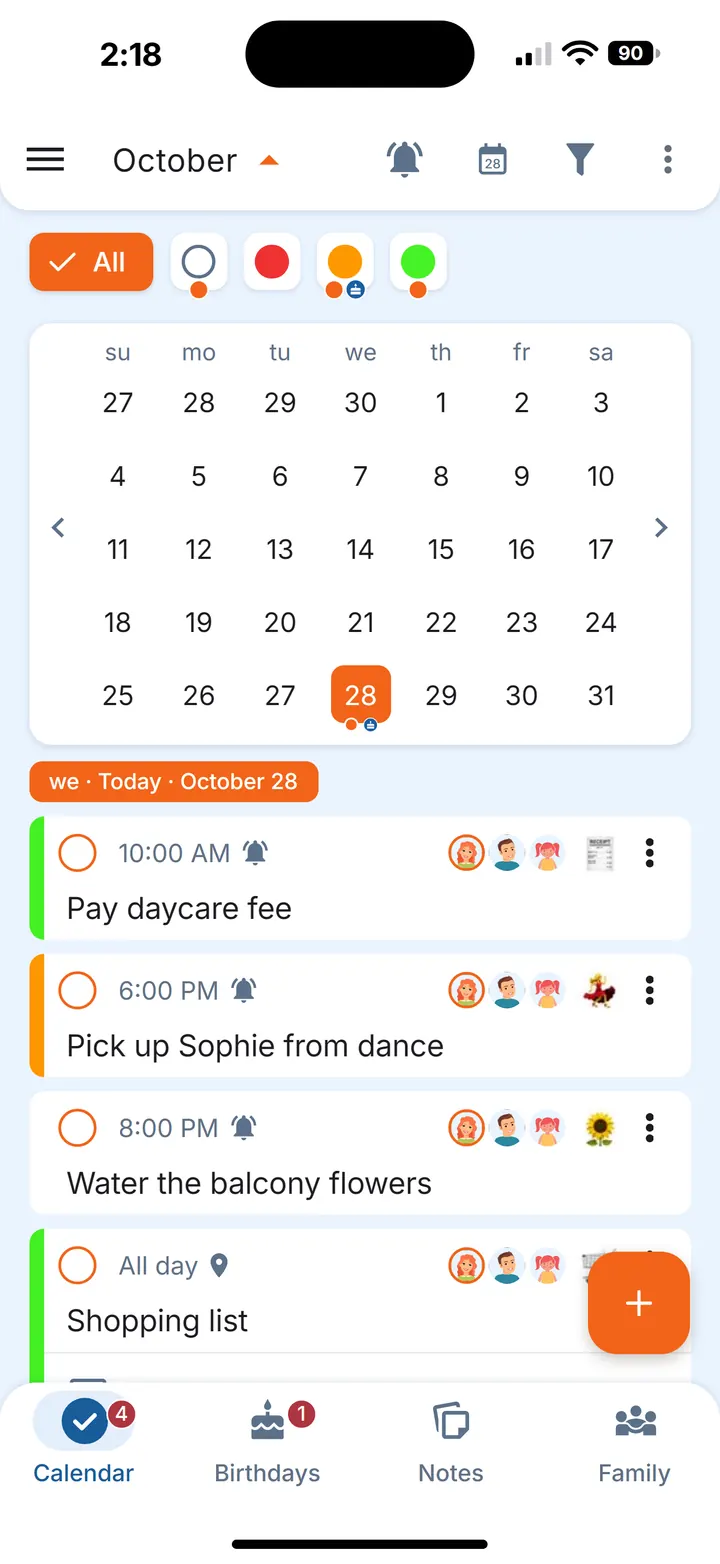
- See the week at a glance. In the calendar, an orange dot under a date means something is still open that day, a grey dot means everything is done.
Sharing chores at home
If you live with a partner or family, share each chore errand with them by tapping their avatars. Everyone it's shared with sees it and gets their own reminders. If you're busy on the day, hand the errand over to someone else: it becomes theirs and leaves your list. For more ideas on running the list as a couple, see List of household chores for couples.
Questions
What chores should be done every day?
Usually the dishes, wiping kitchen surfaces, making the beds, a quick tidy and feeding pets — small jobs that take a few minutes and make the weekly clean easier.
How often should bed sheets be changed?
Many households change them every one or two weeks. Whatever you choose, a repeating errand every 1 or 2 weeks keeps it on schedule.
How do I remember monthly chores?
Put them on a repeating monthly errand with a reminder. Dates like “the last day of the month” or “the second Tuesday” can be set directly.
Can a chore repeat only on certain weekdays?
Yes. Weekly errands can repeat on chosen days, for example Monday, Wednesday and Friday.
Is Family Errands free?
New accounts start with a free trial. After the trial, one subscription, monthly or yearly, covers the whole family of up to 5 people: family members who join don't need a subscription of their own.