The hand-off problem
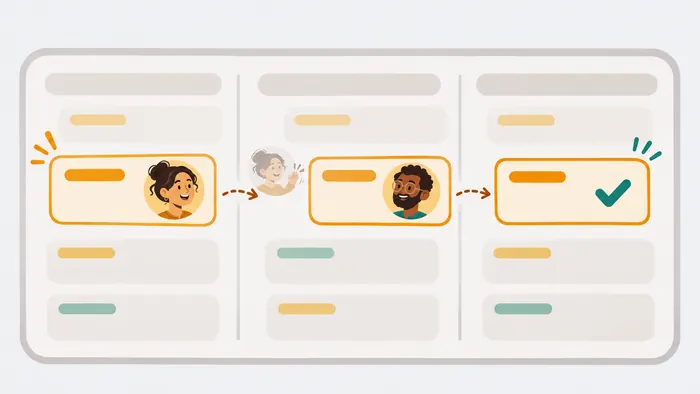
On a Kanban board, a card moves from “To do” to “In progress” to “Review” to “Done”. Each move usually means a new person is responsible — but the members on the card stay the same until someone changes them by hand. Cards in “Review” with no reviewer, or cards in “Done” still showing on everyone's list, are the result.
Trello has its own automation where you can build rules for card moves; how it works and what your plan includes is described on Trello's help pages. If you prefer ready-made settings per list instead of writing rules, a Power-Up can cover this job.
Set it up with Board Assistant
Board Assistant is a Trello Power-Up. Its Manage members section decides what happens to a card's members when the card is moved into a list.
Open the section
Click the Board Assistant button on the board, open Manage members and pick the board in the board picker.
Choose an action for each list
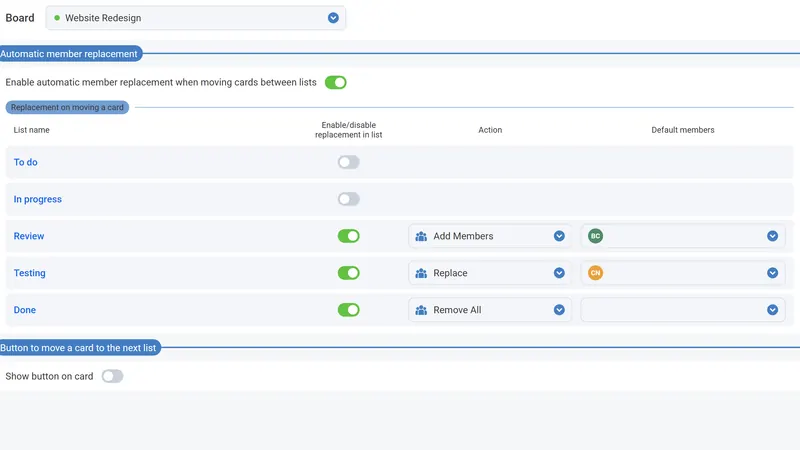
For every list, pick one: no change, add selected members, remove selected members, replace the members with selected ones, or remove all members.
Pick the members
Set the default members for each list, for example the reviewer for “Review” and the tester for “Testing”.
Switch the rules on
Rules can be turned on or off per list and for the whole board.
Move a card to test it
Drag a card into “Review” and check that the reviewer has been added.
Example: a development pipeline
- In progress — add the developer.
- Review — add the reviewer.
- Testing — replace the members with the tester.
- Ready for release — replace the members with the release manager.
- Done — remove all members.
One-click hand-off with the Next list button
Optionally, a button can appear inside cards that moves the card to the next list in one click; you can rename it (up to 16 characters), for example “Hand off”. Together with the member rules, one click passes the card to the next stage and to the next person.
Exceptions for special cards
Sometimes one card must keep its owner all the way through. The rule can be shown inside the card (“Manage members when moving this card between lists”), and for that card you choose a different action and members per list. The rest of the board keeps the usual rules.
Questions
Can Trello automatically assign a card when it moves to a list?
With Manage members, yes: set “add” or “replace” for that list and choose the members.
How do I remove members when a card is done?
Set “remove all” for your “Done” list. Every card moved there loses its members.
Can I swap the developer for the tester instead of adding both?
Yes. Use “replace” for the testing list, and the selected members replace whoever was on the card.
Does every board member need a subscription?
No. One member connects the board to a plan; everyone on that board can then use Board Assistant there.
Who can change the rules?
Manage members settings belong to the board: any board member can change them, and they apply to everyone.