Two kinds of limits: open and total
Trello sets limits per board, and for cards and lists there are two of them:
- Open — cards and lists that are currently on the board.
- Total — open and closed together, which includes everything archived.
That difference decides the fix. If you hit the open limit, archiving old cards or lists frees space. If you hit the total limit, archiving does not help: archived items still count, and only deleting them — or moving them to another board — brings the number down.
Trello's developer documentation describes how these limits work and notes that they can differ between boards and accounts, so check the numbers for your own board rather than relying on a figure from a forum post.

Why old boards get there
- Years of finished work. Every card moved to “Done” and archived stays on the board.
- Lists per week or per sprint. A new list every week adds up to hundreds of lists, most of them archived and empty.
- Templates and copies. Cards created from templates or by automation pile up faster than anyone archives them.
Check how close the board is
Board Assistant's Board admins section shows a table of your boards connected to a plan, with indicators when a board approaches or reaches Trello's limits — members, open and total cards, lists, checklists, labels, Custom Fields, attachments and more. The data is read live from Trello each time. Look here first: it tells you whether the problem is open cards, total cards or lists.
Clean up the board with Bulk card actions
Add the Power-Up
Add Board Assistant to the board, open it with the Board Assistant button and connect the board to a plan (the free plan is enough to try it).
Open Bulk card actions
In the Board Assistant window, open Bulk card actions and pick the board.
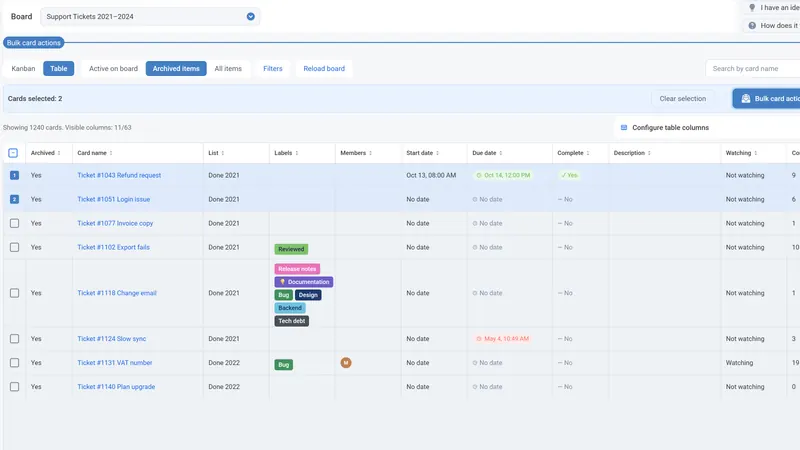
Show archived items
Switch to archived items, so you see what is hidden from the board but still counts towards the total.
Filter what can go
Use filters such as list, dates or labels — for example, archived cards from lists of past years. Saved filter sets help when you repeat the cleanup later.
Delete the cards, or move them
Delete the archived cards you no longer need, or move them to a separate archive board connected to your plan if you want to keep them. The preview shows exactly how many cards are affected, and deleting asks for confirmation.
Delete empty lists
In the Kanban view, click “Select list” on each old list, open the list actions and choose to delete empty lists. Lists with no active cards are deleted together with any archived cards still in them; the preview and the confirmation show how many.
Check the result
The result shows how many cards were changed, skipped (with the reason) or failed; then look at the board in Board admins again.
If the board hits the open limit instead, the same section can archive all cards in old lists or archive whole lists in one step.
Before you delete
- Deleting is permanent. Archived cards can be restored; deleted ones cannot. When in doubt, move cards to an archive board connected to your plan instead.
- Agree with the team. Settle which lists and periods are safe to remove before you start.
- Your own permissions apply. Bulk card actions work with your own Trello permissions, so you can only change what you could change by hand.
Keep the board from filling up again
- Move finished work to an archive board once a quarter instead of only archiving it.
- Reuse lists instead of creating a new one for every week.
- Glance at the limit indicators in Board admins from time to time, so you clean up before Trello stops new cards.
Questions
Why can't I add a card to my Trello board?
Often the board has reached one of Trello's limits for cards or lists. Archived cards count towards the total limit, so an old board can reach it even if it looks almost empty.
Does archiving cards help with the Trello card limit?
It helps with the limit for open cards. For the total limit it does not, because archived cards still count; delete them or move them to another board.
Can I delete all archived cards in Trello at once?
With Board Assistant's Bulk card actions you can show archived cards, filter them and delete the selection in one step, after a preview and a confirmation.
How do I get rid of hundreds of old lists?
Empty the lists first — delete or move their cards — and then delete the empty lists in bulk with the list actions; archived cards still in those lists are deleted with them.