Start with your parent
Your parent is the one whose life this is. Before you set anything up, sit down together and ask what they'd like help with and what they'd rather keep doing themselves. Some people are glad to hand over the pharmacy run but want to book their own appointments; others want a lift but not a reminder.
If your parent uses a smartphone and wants to, they can be part of the same shared list. If they don't, the list is simply for the helpers' own errands. Either way, the plan is theirs to agree to and change.
The errands that usually come up
A rough list to talk through together, keeping only what applies:
- Appointments: doctor, dentist, optician, hearing checks, and who can give a lift on the day
- Medicines running out: collecting a repeat prescription before the last pack, a pharmacy run
- Shopping: a weekly grocery list, household basics, things that are heavy to carry
- Around the home: a dripping tap, changing a light bulb, the smoke alarm battery, the garden
- Paperwork as to-dos: a letter to reply to, a renewal date, a bill to post — noted as an errand with a date, nothing more
- Visits and calls: a regular visit, a Sunday phone call, a birthday coming up
- Lifts and outings: a hairdresser appointment, a visit to friends, a trip to the shops
Sharing the errands between siblings or partners
When several people help, the usual difficulty is not effort but information: one sibling booked the appointment, another doesn't know about it, and a third bought the same groceries twice. Many families find it easier when the errands sit in one shared list rather than in a group chat.
Some practical habits that tend to help:
- Agree who's nearby for what. Someone who lives close may take the lifts; someone further away can make the phone calls or handle the paperwork.
- Talk about it openly, ideally with your parent in the conversation, and check in again when things change.
- Swap when life gets busy. A shift at work or a sick child means someone else takes over that week, without a long chat thread.
- Keep it kind. Everyone helps in a different way and at a different pace; the list is there so nobody has to remember everything alone.
Setting it up in Family Errands
Family Errands keeps household errands in one shared place. A family in the app is up to 5 people in total, for example you, a sibling and your partner, or your parent too if they use a smartphone and want to join. Each person installs the app and joins by an invitation link.
Invite the helpers
Send the invitation link through any messenger; once the person has installed the app and signed in, opening the link takes them to the joining screen, where one tap confirms it (on iPhone, tap the link again after installing).
Add each appointment as an errand
Give it a date and time, add the address as a note in the description, and share it with whoever's going. Each person sets their own reminder: one an hour before, another the evening before.
Hand an appointment over when plans change
If you can't make the lift on Thursday and the errand is yours, hand it over to your sibling: it becomes theirs and leaves your list.
Plan prescription collections
Create a repeating errand for collecting the prescription at the interval the pharmacy or doctor has given, with a reminder a few days ahead. A reminder is a helping hand, not a safeguard, so keep the pharmacy's own dates in view too. Keep it to the errand of picking it up; the medicines themselves are a matter for their doctor and pharmacist.
Get the pharmacy list at the pharmacy
Keep a separate pharmacy errand without a date, give it the pharmacy as its place and choose to be reminded on arrival, so the list of what to pick up appears as you walk in.
Make regular visits repeat
A weekly visit, a Sunday call or a monthly bigger shop can repeat on its own day, for example every Saturday, or on the second Tuesday of the month.
Write paperwork down as to-dos
“Reply to the letter about the boiler service” can be an errand with a date; something without a deadline can stay visible every day until it's done.
Small things that help
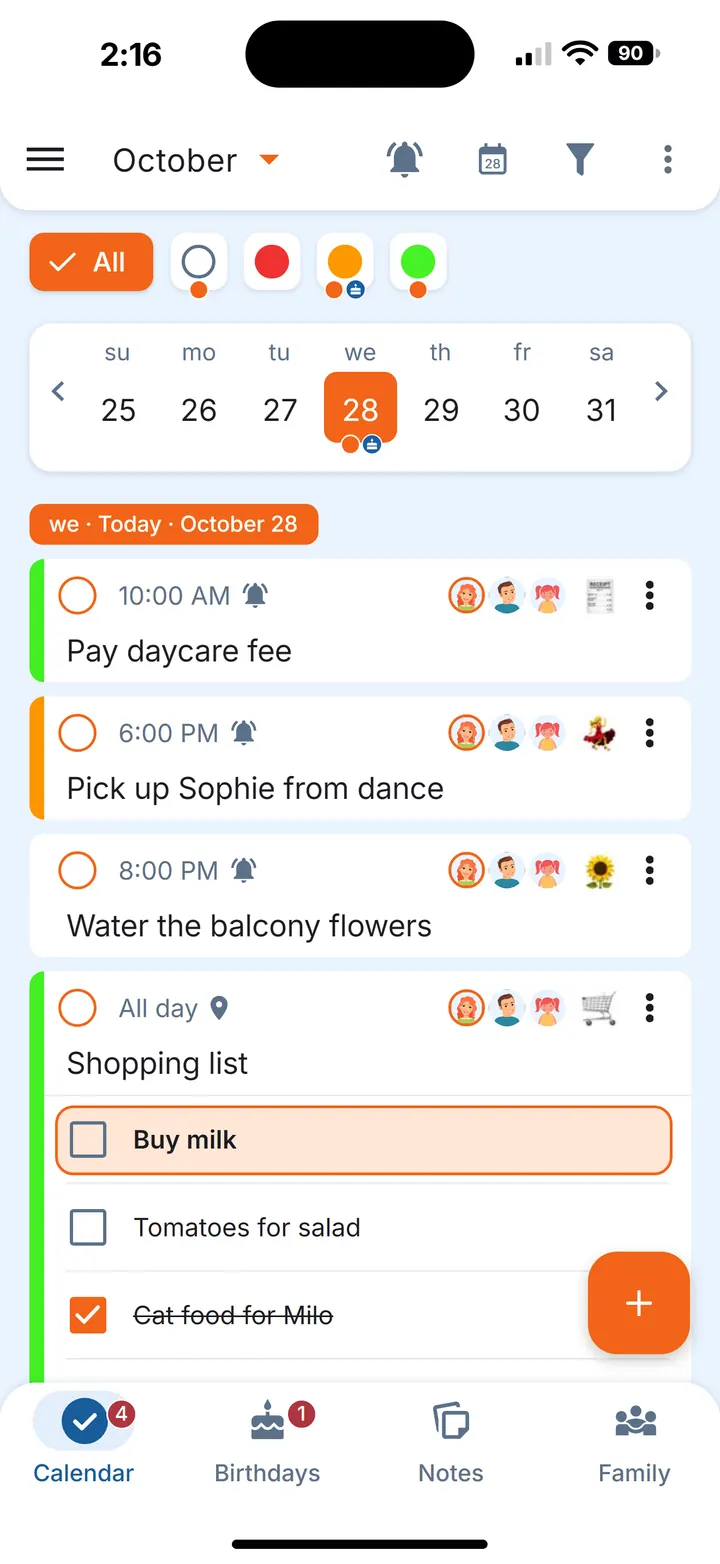
- A shopping list for your parent's home. Share one grocery errand with a checklist; whoever is going adds items or ticks them off in the shop. More ideas in shared grocery list app.
- A template for regular visits. Write the usual visit checklist once in a note — post to check, bins out, plants watered — and create a fresh errand from it before each visit.
- A reminder that keeps coming back. For a phone call you keep putting off, make the reminder repeat every 15 minutes until you mark the errand done.
- Birthdays and family dates. Keep your parent's birthday and their friends' and grandchildren's birthdays in the Birthdays section, with gift ideas shared among the family. See birthday reminder app.
- Sharing the load at home too. If you're also running your own household, mental load covers getting what's in your head into a shared list.
Questions
How do siblings share the care of an elderly parent?
Many families split it by what each person can realistically do: whoever lives nearby takes lifts and visits, others take calls, shopping or paperwork. Keeping those errands in one shared list means everyone sees what's coming and can swap when plans change.
How can I avoid caregiver burnout?
That's a question for your own doctor or a professional if you're struggling. On the organising side, it can help to have the errands written down and shared, so they aren't all carried in one person's head, and to swap with someone else when you need a break.
How do you handle a parent who doesn't want help?
Start from what they want. Ask which things they'd like to keep doing and which they'd be glad to hand over, and respect their answer. Their independence matters more than any list.
Does my parent need to use the app?
No. The app can be used just by the helpers for their own errands. If your parent uses a smartphone and wants to join, they can be one of the up to 5 people in the family.
Is Family Errands free?
New accounts start with a free trial. After the trial, one subscription, monthly or yearly, covers the whole family of up to 5 people: family members who join don't need a subscription of their own.