When a reminder by place works better than one by time
A reminder at 17:30 is useful when you know exactly where you'll be at 17:30. Many household errands don't work like that. You don't know when you'll pass the shop, you only know that when you're there, you need bread, batteries and the thing you thought of this morning.
A reminder tied to a place fits errands like these:
- The shopping list at the shop. The list is only useful in the aisle, so that's where it should appear.
- Something to take with you. A parcel for the post office, a permission slip for school, a library book: the right moment is when you leave home, not an hour earlier.
- A short list for a quick stop. Plasters and toothpaste from the pharmacy, a key cut at the hardware shop — small things that are easy to forget once you're standing at the counter.
A good rule of thumb: if the question is “where will I be when I can do this?”, a place reminder is the natural fit. If the question is “when does this have to happen?”, a time reminder is.

Arrive or leave: choose the right moment
A place reminder has two triggers, and picking the right one makes the difference.
- On arrival — the reminder appears when you get to the place. Use it for lists you need there: groceries at the supermarket, a few items at the pharmacy.
- On departure — the reminder appears when you go away from the place. Use it for things you must take from there: the parcel by the door, the sports kit, the form that needs to go back to school.
Most “don't forget to bring…” errands suit On departure at home. Most “while you're there, also get…” errands suit On arrival at the shop.
How to set a location-based reminder in Family Errands
In Family Errands, a place is part of an errand, just like its date or checklist.
Create an errand
Open the calendar and add a new errand, for example “Groceries”. Add what you need to its checklist, one item per line.
Add a place
Choose the place for the errand: a saved place, or a one-off point if you only need it this once.
Choose On arrival or On departure
Decide whether the reminder should appear when you get there or when you go away.
Set the radius
The area around the place can be from 100 to 500 metres.
Save the errand
When you walk into the store you picked, the notification shows your grocery list.
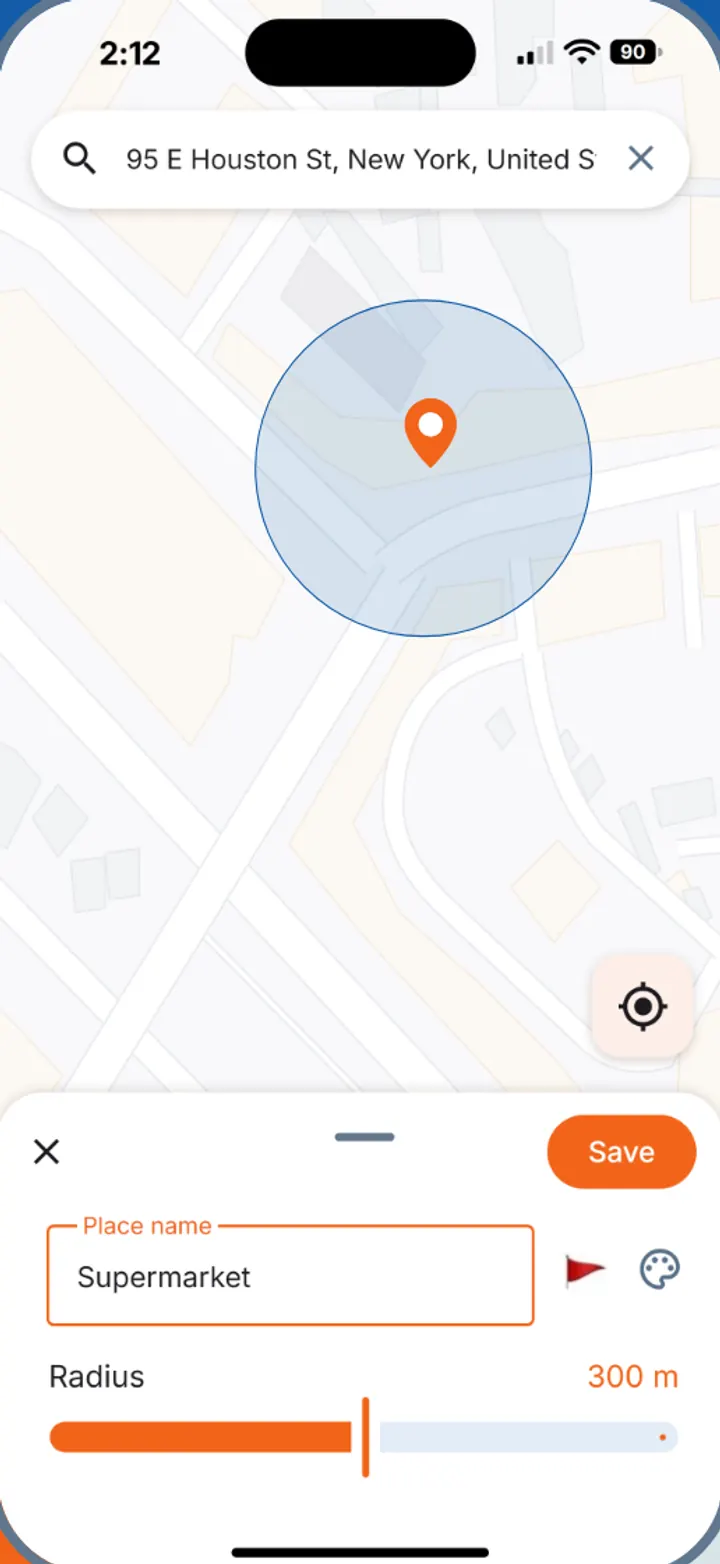
Tip. Places you use often can be saved with a name, colour and icon — Home, Supermarket, Pharmacy — so next time you pick them from the list instead of finding them again.
Three everyday examples
The grocery list at your supermarket. Keep the week's groceries in one errand with a checklist and set it to remind you on arrival at your supermarket. When you walk in, the list is on your screen, and you tick items off as they go into the basket. If you share the errand with your partner, whatever they add at home shows up on your phone too. More on that in our guide to a shared grocery list app.
The permission slip on the way out. A signed slip on the hall table is easy to walk past. Create an errand “Take the permission slip to school”, add Home as its place and choose On departure. When you leave home in the morning, the reminder appears while the slip is still within reach.
A quick pharmacy stop. Add the few things you need to an errand and pick your pharmacy as the place with On arrival. When you get there, the list of what to buy appears.
Check only at the hours you need
On Android, Family Errands has a location schedule: the app checks your places only on the days and hours you choose, for example only on weekdays from 8:00 to 20:00. On iPhone, place reminders work the same way — on arrival or on departure — but there is no location schedule. That suits errands that belong to your working week, like a reminder when you leave home in the morning.
Location reminders in a shared household
A place reminder is your own: it tells you that you've reached the shop. The app does not show where other family members are. What you share is the errand itself — the list, the checklist, the date — so whoever ends up at the shop can see what's still needed and tick it off.
That makes place reminders a good partner to a shared list. One of you adds items during the week; the other gets the list when they arrive at the supermarket. For keeping the household's everyday tasks together, see our family to-do list guide.
Questions
Can you set a reminder based on location?
Yes. In Family Errands you add a place to an errand and choose whether to be reminded when you arrive there or when you leave. The radius around the place can be from 100 to 500 metres.
Is there an app for location-based reminders on Android?
Yes — on iPhone and Android: pick a saved place or a one-off point, choose to be reminded on arrival or on departure, and the notification shows your errand with what's left on its checklist.
Can I save the places I use often?
Yes. Places can be saved with a name, colour and icon, such as Home, Supermarket or Pharmacy, and reused for other errands.
Can I limit when the app checks my location?
On Android, yes: a location schedule lets you choose the days and hours when places are checked, for example only on weekdays from 8:00 to 20:00.
Does it work on iPhone?
Yes. Place reminders work on iPhone too — on arrival or on departure; only the location schedule is Android-only.