Why a list on the home screen helps
A list inside an app works only when you remember to open the app. A widget reverses that: the list is simply there. A few habits make a home-screen list useful rather than just decorative:
- Show one thing per widget. A widget that tries to show everything becomes another screen to scroll. Pick what you want to see at a glance — this week, one list, or the next birthdays.
- Put it on the first screen. A widget two swipes away is as easy to forget as an app.
- Keep it short. A list you can read in a second is a list you actually read.
- Make it tickable. If you can tick an item where you see it, the list stays up to date without extra effort.

The three Family Errands widgets
### Calendar: the week at a glance
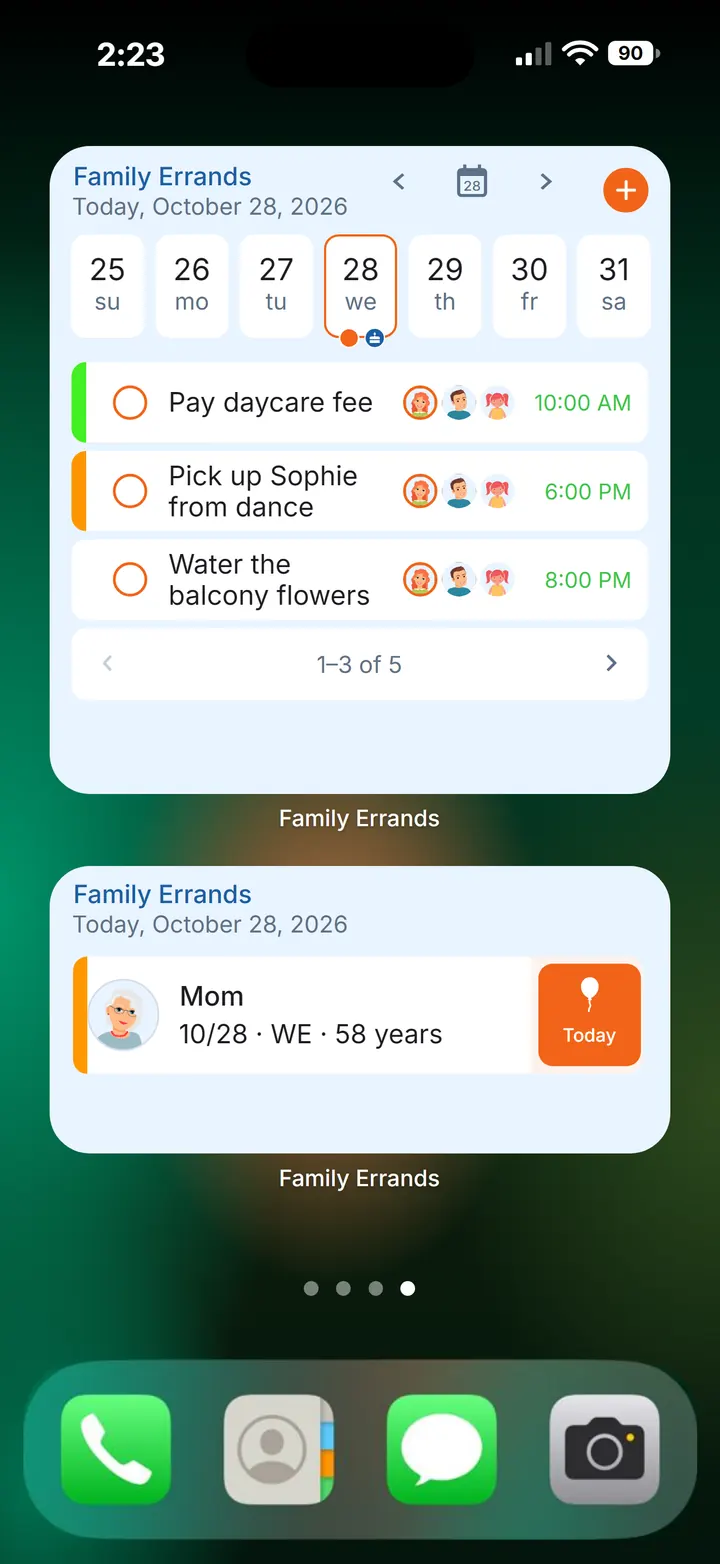
The Calendar widget shows 1 to 4 weeks with your errands. It can use the app's own settings, or settings of its own — for example its own colours, or showing shared errands only. A widget with only the shared errands gives you a quick view of what the household has on, separate from your personal to-dos.
### Selected errand: one checklist you can tick
The Selected errand widget shows one errand with its checklist, and you can tick items right on the home screen. It suits any list you work through in one go: the week's groceries, the things to take to the tip on Saturday, a short list of jobs before guests arrive. If the errand is shared, what you tick is what everyone it's shared with sees as done. For a grocery list shared between two people, see how to share a grocery list.
### Birthdays: who's next
The Birthdays widget shows the nearest birthdays. It's a quiet way to keep the next few dates in view, so a birthday doesn't come as a surprise the evening before. The gift ideas, reminders and celebration history stay in the app's Birthdays section — the widget is the reminder to look there. More on that routine in how to remember birthdays.
How to add a Family Errands widget
On Android, you can add a widget straight from the app menu. You can also add it the usual way, from your phone's widget list.
Decide what you want to see
The coming weeks, one list, or the next birthdays — that tells you which widget to pick.
For a list, create the errand first
Add an errand with a checklist, one item per line. Already have the list in a chat or a note? Copy it, and the app offers to make the copied text into a new errand with each line as a separate checklist item.
Add the widget
On Android, add it from the app menu or from your phone's widget list. On iPhone, touch and hold an empty area of the Home Screen, tap Edit → Add Widget and choose Family Errands.
Choose the errand or the settings
For Selected errand, pick the errand to show. For Calendar, choose whether it follows the app's Calendar settings or uses its own — with its own settings you also pick 1 to 4 weeks, colours or shared errands only. On iPhone, these settings are in the app menu under Widgets, and the errand for Selected errand is chosen with Edit Widget.
Place it where you'll see it
Put it on the first home screen, next to the apps you open most.
Small ideas that work well
- A grocery list by the camera icon. Keep the shopping list as a Selected errand widget and tick items off in the store without opening anything.
- A shared-only calendar. Use the Calendar widget with shared errands only, so the household plan sits apart from your personal errands.
- Birthdays next to your calendar. A Birthdays widget beside the Calendar widget shows both the week's errands and who's celebrating soon.
- Complete from wherever you are. An errand can be marked complete from its card, the errand screen or the widget — whichever is in front of you. For reminders that keep coming back until the job is done, see reminders that repeat until done.
Questions
Can I tick off checklist items from a widget?
Yes. The Selected errand widget shows one errand with its checklist, and items can be ticked right on the home screen.
Is there a birthday widget?
Yes. Family Errands has a Birthdays widget that shows the nearest birthdays on your home screen.
Does the widget work on iPhone?
Yes. All three widgets — Calendar, Selected errand and Birthdays — are available on iPhone too, and you can tick checklist items on the Selected errand widget there as well.